
在线表单,问卷调查,问卷系统,考试系统;类似项目: Tduck填鸭表单系统(开源在线表单收集工具)
可应用于学校、组织或公司的意向调查和公开查询修改系统等;
有什么用
- 可以把需要手机的问题,通过邮件或短信发送给客户;等客户或相关人员有空了,进行填写。
- 后台收到问卷答复以后,确认用户的需求;同步通知并进行下一个流程的操作
- 可以导入数据后,做一个查询系统;实现直接了当的界面,让用户输入查询条件后查询到整行数据
- 类似逐条Excel个人数据的隐私输入、查询和修改系统
- 详见章节:公开查询
- 卷王问卷(SurveyKing)是一款部署简单,功能强大,开源免费的企业级在线问卷考试系统。
怎么用
网页中在线使用:https://ask.carlzeng.com:4443/user/login
开放测试/学习 用户名/密码:test/test
相关内容
实现方法
体验版
优点:一键发布,简单不管什么数据库;
vi docker-compose.yml
version: '3.9'
services:
    surveyking:
        image: surveyking/surveyking
        ports:
            - '8098:1991'
转化来源:docker run -p 1991:1991 surveyking/surveyking
转化工具:https://it-tools.carlzeng.com:3/docker-run-to-docker-compose-converter
如果要挂载数据文件:
version: '3.9'
services:
    surveyking:
        image: surveyking/surveyking
        volumes:
            #- './logs:/logs' #注释掉就不要log永久保留在硬盘
            - './files:/files'
        ports:
            - '8098:1991'
首次安装时默认用户/密码:admin/123456
https://ask.carlzeng.com:4443/user/login
开放测试 用户名/密码:test/test
如何默认字段内容
日期字段,想要让页面加载时自动输入当前日期。
解决办法:公式设置为CURRENT_DATE()
正式版v1.6.0
数据不清楚保存在哪儿?重启docker,之前的问卷已经答复等数据如何保存?
重启docker,之前保存的问卷和数据依旧存在。
当之前的docker-compose文件修改后,在重启docker-compose,数据就全丢失
完整的docker-compose.yml,3月20日已测试,仅供参考
已将mysql更换为mariadb,因为它的的资源消耗比较合理(不会肆意吃服务器资源)
version: '3'
services:
    surveyking_mysql:
        environment:
            MYSQL_ROOT_PASSWORD: "123456"
            MYSQL_DATABASE: "surveyking"
        image: "mariadb:jammy" #"mysql:5.7.39"
        container_name: "surveyking_mysql"
        restart: always
        networks:
            - surveyking_net
        ports:
            - 3307:3306
        volumes:
            - "./init-mysql.sql:/docker-entrypoint-initdb.d/init-mysql.sql"
            - "/etc/localtime:/etc/localtime:ro"
            - "./mysql_data:/var/lib/mysql"
        command:
            - "--character-set-server=utf8mb4"
            - "--collation-server=utf8mb4_unicode_ci"
        logging:
            driver: "json-file"
            options:
                max-file: "5"
                max-size: "100m"
    surveyking:
        environment:
            JAVA_OPTS: "-Xms128m -Xmx1024m"
        image: "openjdk:8u342-jdk"
        container_name: "surveyking"
        restart: always
        networks:
            - surveyking_net
        ports:
            - 8098:1991
        logging:
            driver: "json-file"
            options:
                max-file: "5"
                max-size: "100m"
        volumes:
            - "./surveyking-v1.6.0.jar:/surveyking.jar"
            - "/etc/localtime:/etc/localtime:ro"
            #- "./logs:/logs" #only enable for debug
            - "./files:/files"
        depends_on:
            - surveyking_mysql
        command: [
                "sh",
                "-c",
                "java -jar /surveyking.jar --spring.datasource.url=jdbc:mysql://surveyking_mysql/surveyking --spring.datasource.username=root --spring.datasource.password=123456"]
networks:
  surveyking_net:
重新初始化部署步骤:
- 把这个docker停掉
- 然后把当前目录下的这三个文件夹删除,
- 然后重新手动创建一下这三个文件夹:files, logs,mysql_data
公开查询
能实现和金山快查相同的功能,甚至比他更强大。
主要功能特性:
- 支持大数据量 excel 导入,实测导入 10 万数据查询、修改都非常流畅
- 可以对同一个问卷创建多个公开查询
- 支持自由组合多个查询条件
- 支持查询项权限过滤,每个查询项支持三种模式,只读、允许修改、隐藏,支持查询结果查看、修改
- 支持查询结果,图片上传、签名等
使用说明:公开查询设置页面说明
测试问卷使用的测试数据
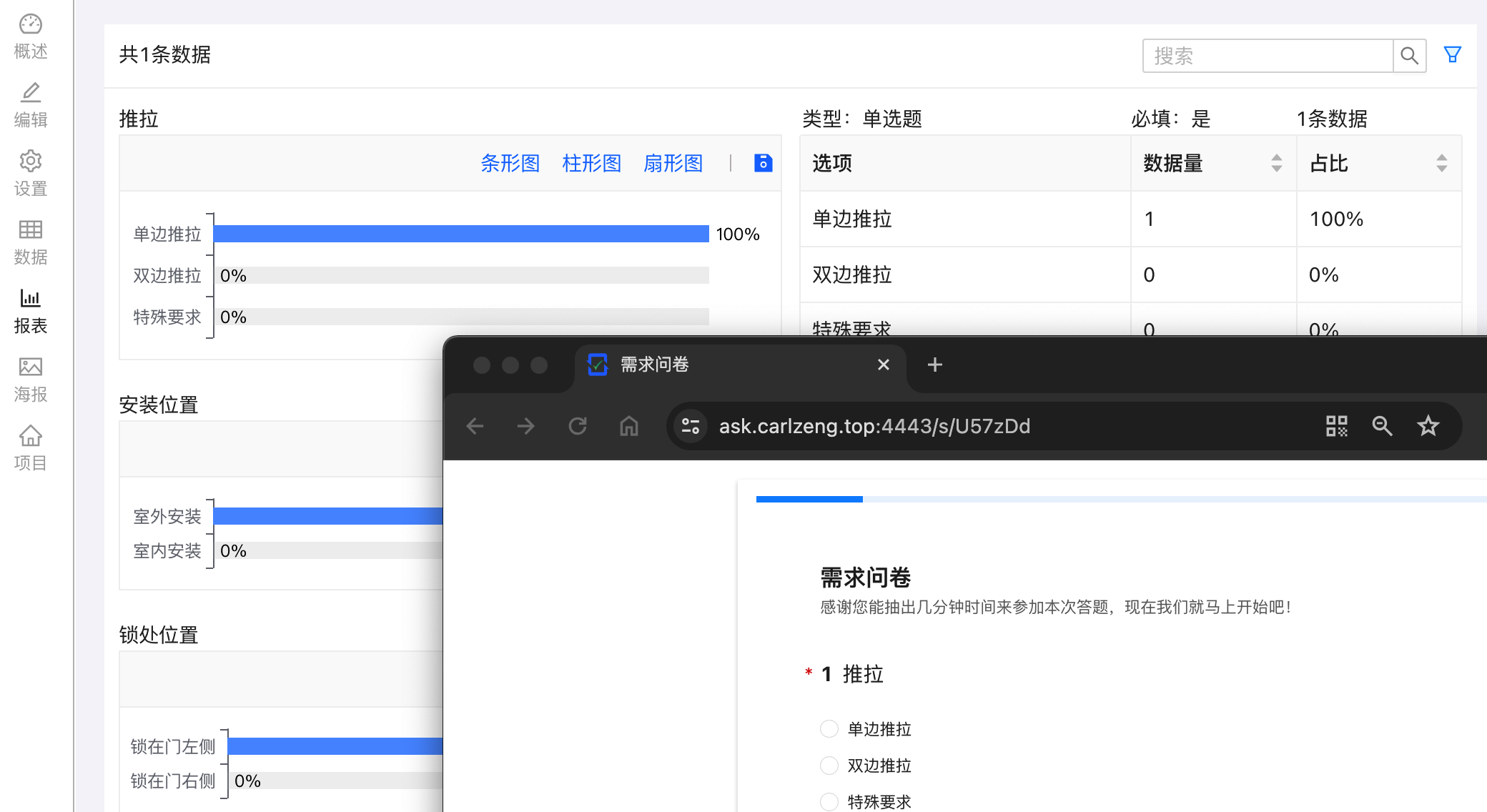
这个问卷JSON数据,可以复制后直接粘贴到编辑模式下的JSON编辑,然后预览即可获得一个简易问卷

{
 "id": "U57zDd",
 "title": "<strong style=\"font-size: 36px;\">需求问卷</strong>",
 "description": "感谢您能抽出几分钟时间来参加本次需求问卷,现在我们就马上开始吧!",
 "type": "Survey",
 "attribute": {
  "suffix": "您已完成本次问卷,感谢您的帮助与支持",
  "submitButton": "提交"
 },
 "children": [
  {
   "id": "crrm",
   "title": "推拉方式",
   "description": "国标防盗门一般使用'单边推拉'",
   "type": "Radio",
   "attribute": {
    "required": true
   },
   "children": [
    {
     "id": "mn1n",
     "title": "单边推拉",
     "attribute": {}
    },
    {
     "id": "frvq",
     "title": "双边推拉",
     "attribute": {}
    },
    {
     "id": "a3y8",
     "title": "特殊要求",
     "attribute": {}
    }
   ]
  },
  {
   "id": "55tb",
   "title": "安装位置",
   "type": "Radio",
   "attribute": {
    "required": true
   },
   "children": [
    {
     "id": "bufj",
     "title": "室外安装",
     "attribute": {}
    },
    {
     "id": "mm95",
     "title": "室内安装",
     "attribute": {}
    }
   ]
  },
  {
   "id": "tukl",
   "title": "锁处位置",
   "type": "Radio",
   "attribute": {
    "required": true
   },
   "children": [
    {
     "id": "h4w2",
     "title": "锁在门左侧",
     "attribute": {}
    },
    {
     "id": "gt2j",
     "title": "锁在门右侧",
     "attribute": {}
    }
   ]
  },
  {
   "id": "l6nl",
   "title": "边框颜色(纱网默认灰色)",
   "description": "<img src=\"/api/public/preview/sqqsybc2kWdUsy1f7xtiL\">",
   "type": "Radio",
   "attribute": {
    "required": true
   },
   "children": [
    {
     "id": "a5yw",
     "title": "咖啡色",
     "attribute": {}
    },
    {
     "id": "2v4x",
     "title": "白色",
     "attribute": {}
    },
    {
     "id": "2mkw",
     "title": "灰色",
     "attribute": {}
    },
    {
     "id": "w0a9",
     "title": "古铜色",
     "attribute": {}
    },
    {
     "id": "df5c",
     "title": "黑色",
     "attribute": {}
    },
    {
     "id": "dn2c",
     "title": "香槟色",
     "attribute": {}
    },
    {
     "id": "mlly",
     "title": "黄木纹",
     "attribute": {}
    },
    {
     "id": "5o4t",
     "title": "红木纹",
     "attribute": {}
    },
    {
     "id": "6xgr",
     "title": "金橡木",
     "attribute": {}
    }
   ]
  },
  {
   "id": "raoo",
   "title": "上传现场照片(含门洞全貌照片)",
   "type": "Upload",
   "attribute": {
    "required": false
   },
   "children": [
    {
     "id": "44dx",
     "attribute": {
      "fileAccept": ".jpg,.jpeg,.png,.gif"
     }
    }
   ]
  },
  {
   "id": "lp3i",
   "title": "手机号码",
   "type": "FillBlank",
   "attribute": {
    "required": true,
    "examAnswerMode": "none"
   },
   "children": [
    {
     "id": "26c8",
     "attribute": {
      "dataType": "mobile",
      "required": true,
      "calculate": ""
     }
    }
   ]
  },
  {
   "id": "s5oj",
   "title": "姓名(如何称呼您)",
   "type": "FillBlank",
   "attribute": {
    "required": true,
    "visibleRule": ""
   },
   "children": [
    {
     "id": "mo8z",
     "attribute": {
      "calculate": ""
     }
    }
   ]
  },
  {
   "id": "v22e",
   "title": "创建日期",
   "type": "FillBlank",
   "attribute": {
    "required": true,
    "visibleRule": "",
    "requiredRule": ""
   },
   "children": [
    {
     "id": "miob",
     "attribute": {
      "dataType": "date",
      "readOnly": false,
      "calculate": "CURRENT_DATE()",
      "dateTimeFormat": "YYYY-MM-DD"
     }
    }
   ]
  }
 ]
}
临时测试链接:https://ask.carlzeng.com:4443/s/nK2Kxr
发现的小问题
在安卓手机端+Kiwi Browser打开这个问卷,点击上传图片,就会导致整个浏览器奔溃退出。
同样的步骤在Chrome下就没有这个问题,所以这问题可忽略不计
灵感来源
开源&Docker 篇四十二:NAS部署,支持可视化编辑、发布的开源问卷&试卷系统—卷王
Docker run to Docker compose converter
https://gitee.com/TDuckApp/tduck-platform
发表回复