
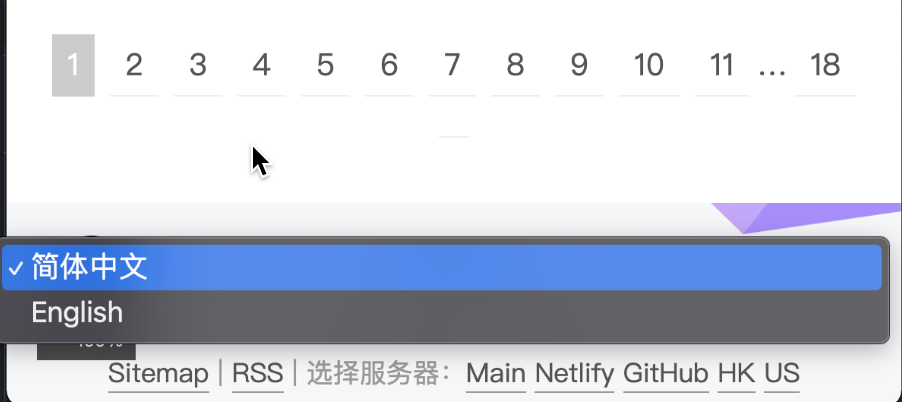
多语言选择
有什么用
这个自定义方案结合了:
1、利用hexo-generator-i18n插件,在文章中加入lang标识来区分,然后在渲染的时候在利用模版程序判断生成
2、直接部署两套Hexo,上传到不同的库当中,然后页面上添加手动切换
怎么用
cd ~/AppTesting/blog && hexo clean && hexo g && cd ~/AppTesting/article_en && hexo clean && hexo g && cd ~/AppTesting/blog && cp -r ~/AppTesting/article_en/public/. ~/AppTesting/blog/public/en/ && HTTPS_PROXY=”socks5://127.0.0.1:7890″ hexo d
是的,浓缩起来就是上面这段命令,实现多语言版发布hexo到github服务器上
cd ~/AppTesting/blog && hexo clean && hexo g && cd ~/AppTesting/article_en && hexo clean && hexo g && cd ~/AppTesting/blog && cp -r ~/AppTesting/article_en/public/. ~/AppTesting/blog/public/en/ && HTTPS_PROXY="socks5://127.0.0.1:7890" hexo d
相关内容
实现方法
创建 Github Workflow
简单解释一下,当我们推送内容到远程
master分支的时候,就会触发这个 Workflow。
我的发布都是直接 hexo d的,没有额外/单独有git push的动作。
利用skip_render排除不同的文件
在source/_posts下面新建两个文件cn和en里面放中文和英文的文章,然后在系统配置文件当中利用skip_render来区分:
在_config.yml里面
skip_render:
  - _posts/en/**
在_config_en.yml
skip_render:
  - _posts/cn/**
先实现,手动的把两个目录下生成的md文件;都上传到两个不同的github repository
11:27am 如何让不同的文件夹下的md 生成到不同的目标文件夹中去?
实现了article_en下独立的hexo的运行
复制出一个article_en文件夹下的内容之后:
rm -rf node_modules && npm install
下一步deploy流程(单命令实现)
cd ~/AppTesting/blog && hexo clean && hexo g &&cd ~/AppTesting/article_en && hexo clean && hexo g && cd ~/AppTesting/blog && cp -r ~/AppTesting/article_en/public/. ~/AppTesting/blog/public/en/ && hexo d
目录结构:
AppTesting
    - blog
    - article_en
需要一个node的程序,或接口,可以简易的把blog下的某个.md文件全文翻译成英语(或其他语言),然后将生成的心的文件放到article_en的子文件夹下
命令运行异常处理
这种git在push到远程服务器上的错误,一般就是因为天朝网络的特殊性来不可把控的
 create mode 100644 "tags/\346\221\207\346\235\206/index.html"
fatal: unable to access 'https://github.com/chuanzhuo/blog.git/': LibreSSL SSL_connect: SSL_ERROR_SYSCALL in connection to github.com:443
FATAL Something's wrong. Maybe you can find the solution here: https://hexo.io/docs/troubleshooting.html
Error: Spawn failed
    at ChildProcess.<anonymous> (/Users/@@@@/blog/node_modules/hexo-util/lib/spawn.js:51:21)
    at ChildProcess.emit (node:events:514:28)
    at ChildProcess._handle.onexit (node:internal/child_process:294:12)
解决办法:
搭配浏览器的插件,测试socks5://127.0.0.1:7890的可用性(比如打开google网址等)
确保服务的实时有效性,然后执行:
hexo deploy
类似的输出是这样的

fatal: Authentication failed
On branch master
nothing to commit, working tree clean
Username for 'https://github.com': chuanzhuo
Password for 'https://[email protected]':
remote: Invalid username or password.
fatal: Authentication failed for 'https://github.com/chuanzhuo/blog.git/'
FATAL Something's wrong. Maybe you can find the solution here: https://hexo.io/docs/troubleshooting.html
Error: Spawn failed
    at ChildProcess. (/Users/carlzeng/AppTesting/blog/node_modules/hexo-util/lib/spawn.js:51:21)
    at ChildProcess.emit (node:events:514:28)
    at ChildProcess._handle.onexit (node:internal/child_process:294:12)
carlzeng@Carls-MBP blog % hexo deploy
解决办法:
重新去 hexo deploy; 或者切换到运行 ./手动推至Github_20231004.sh; 从而有机会去重新输入用户密码
carlzeng@Carls-MBP goProjects % ./手动推至Github_20231004.sh
Username for 'https://github.com': chuanzhuo
Password for 'https://[email protected]':
Everything up-to-date
注意, 密码是在 Personal access tokens (classic)页面重新生成的token长度比较长, 类似:
ghp_aaaaahL1TG3CnKC5jm5c62guk9Udgm2aaaaa
error: RPC failed; HTTP 408 curl 22 The requested URL returned error: 408
nothing to commit, working tree clean
Enumerating objects: 4674, done.
Counting objects: 100% (4674/4674), done.
Delta compression using up to 8 threads
Compressing objects: 100% (728/728), done.
Writing objects: 100% (3044/3044), 3.22 MiB | 3.67 MiB/s, done.
Total 3044 (delta 1994), reused 2421 (delta 1384), pack-reused 0
error: RPC failed; HTTP 408 curl 22 The requested URL returned error: 408
send-pack: unexpected disconnect while reading sideband packet
fatal: the remote end hung up unexpectedly
Everything up-to-date
FATAL Something's wrong. Maybe you can find the solution here: https://hexo.io/docs/troubleshootin
g.html
Error: Spawn failed
    at ChildProcess. (/Users/carlzeng/AppTesting/blog/node_modules/hexo-util/lib/spawn.
js:51:21)
    at ChildProcess.emit (node:events:514:28)
    at ChildProcess._handle.onexit (node:internal/child_process:294:12)
解决办法是: 切换节点; 代理节点的连通性问题.
灵感来源
https://www.igerm.ee/experience/%E5%AE%8C%E7%BE%8E%E7%9A%84Hexo%E5%A4%9A%E8%AF%AD%E8%A8%80%E8%A7%A3%E5%86%B3%E6%96%B9%E6%A1%88
https://github.com/CrazyMayfly/Free-Markdown-Translator/tree/master
如何让python的运行在有proxy的状态下?
又下载测试了这个方案:https://github.com/soimort/translate-shell
homebrew下了半天,运行 翻译,也是无效了。
还是用自己架设的chat gpt吧;
复制黏贴回车,在复制结果,粘贴进Typora;
格式还都保留了(html也保留了,很漂亮)
cd ~/AppTesting/blog && hexo clean && hexo g &&cd ~/AppTesting/article_en && hexo clean && hexo g && cd ~/AppTesting/blog && cp -r ~/AppTesting/article_en/public/. ~/AppTesting/blog/public/en/ && hexo d
目录结构
AppTesting
    - blog
    - article_en
Updates:
en站的footer
把hexo-server/index.js改到本地4001端口,这样两个站点可以同时打开调试。
post详细页面中所有包含中文的模版部分
发表回复